
RGB, CMYK and Pantone: why colours look different in print
Which colour space to use, when you need Pantone and how to avoid surprises at press approval.
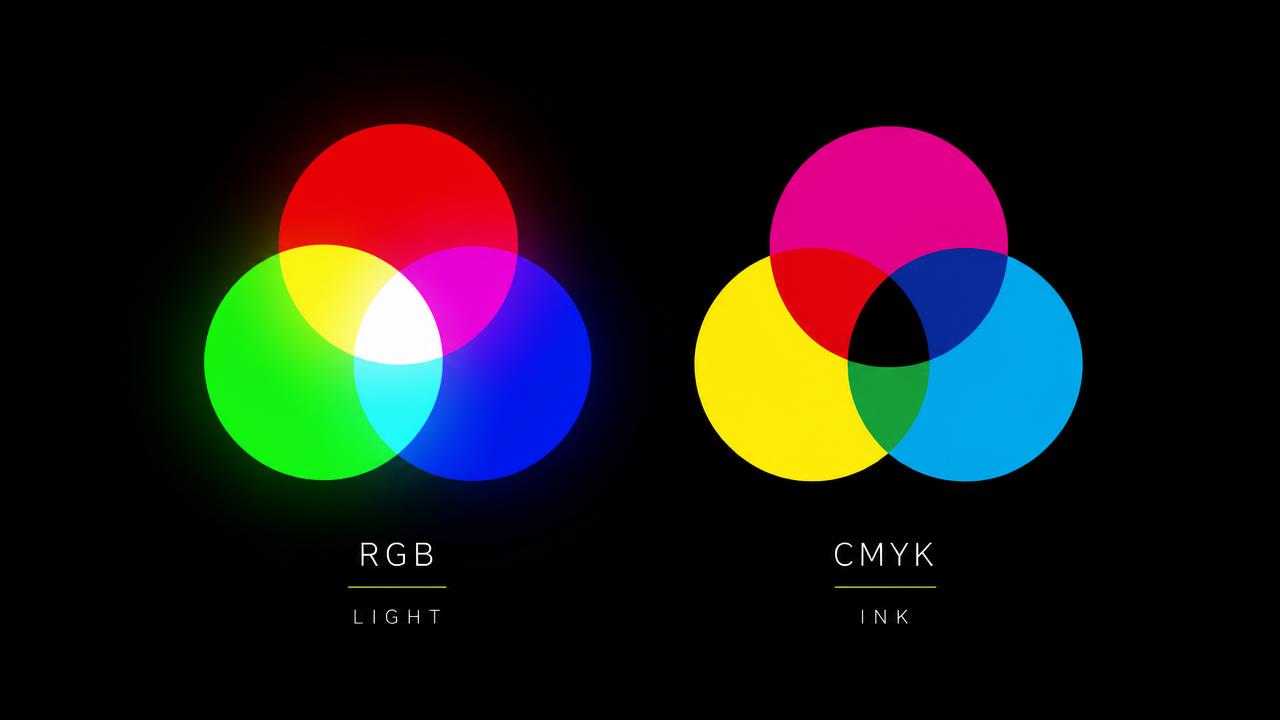
A screen emits light and mixes red, green and blue. Printing lays down ink and mixes cyan, magenta, yellow and black. These are opposite logics, so an electric green on your monitor cannot be reproduced identically on paper.
When to use each colour space
| Space | Used for | What you send |
|---|---|---|
| RGB | web, social media, LED screens | sRGB, PNG or JPG file |
| CMYK | anything printed on paper or vinyl | PDF with a CMYK profile, for example ISO Coated v2 or FOGRA |
| Pantone | brand colours that must not shift | the exact Pantone code, for example 376 C |
What a spot colour is
A Pantone colour is pre-mixed ink, not a combination of four inks. It is used in offset printing, for logos and for corporate colours that are hard to reach in CMYK, such as intense green, saturated orange or deep blue.
RGB and CMYK calculator
Enter your colour and see the CMYK equivalent, how it shifts in print, the total ink coverage and the closest Pantone code.
Instrument
Calculator RGB și CMYK
Introdu o culoare în HEX, RGB sau CMYK și vezi imediat echivalentul, cum arată la tipar și ce setări îți recomandăm în fișier.
Culori de pornire
Tip de suport
Standardul pentru offset pe hârtie cretată: gamut larg și negru dens.
Limită de cerneală pentru acest profil: 330%
Compară ecran și tipar
În afara gamutuluiPe ecran · #B8FB36
Simulare tipar · C 27 M 0 Y 78 K 2
Abatere de culoare (ΔE)63.1
Acoperire totală de cerneală107%Sigur
Cel mai apropiat Pantone
Culoarea nu poate fi reprodusă exact în CMYK. La tipar va ieși mai stinsă, ca în pătratul de simulare. Dacă este culoare de brand, cere Pantone sau o probă de tipar.
Recomandări pentru fișierul de print
- Culoarea nu poate fi reprodusă exact în CMYK. La tipar va ieși mai stinsă, ca în pătratul de simulare. Dacă este culoare de brand, cere Pantone sau o probă de tipar.
- Acoperire mică de cerneală, culoarea este sigură pe orice suport.
- ISO Coated v2 (FOGRA39): Standardul pentru offset pe hârtie cretată: gamut larg și negru dens.
- Pe hârtie, albul suportului intră în culoare. Verifică proba de tipar pe același tip de hârtie, nu pe altul.
- Trimite fișierul cu 300 dpi la print mic și 100 până la 150 dpi la format mare.
Valorile sunt orientative, calculate fără profil ICC. Pentru culori critice, bunul de tipar rămâne referința.
Common mistakes
- Sending an RGB file that gets converted automatically, then being surprised the green looks duller.
- Black built only from K on large areas, which prints grey. Large areas need a rich black, for example C40 M30 Y30 K100.
- Small text in four colours, which looks blurry with the slightest registration shift. Small text should be 100% black only.
- Approving colour on an uncalibrated monitor, without a printed proof.
Need a recommendation for your project?
Tell us what you want to produce and we will suggest the material, format and timeline.